Platform design
A company is a set of identifiers
An investigation answers a question at a moment in time. Monitoring gives that question a durable scope. In Breachify, a company is represented through domains, Android packages and external domains it depends on. The add-company view arranges those three asset types in parallel columns, each with a manual input and a file-import route. A few identifiers can be entered directly; a larger inventory can arrive in bulk. The company list then provides a place for notifications and management actions, although its rows remain unfilled in this design frame.
Separating the organisation from any single domain is a practical modelling choice. A business may operate several brands, mobile applications and services, while an analyst still needs to understand who owns the investigation. The company record supplies that grouping. Before production, imports need validation and a clear preview of what will be added, and destructive actions such as Delete All need confirmation and recovery rules. Those states are work still to draw; the visible controls establish the proposed workflow rather than proving its implementation.
Identity, notifications, access
Settings collects several responsibilities: user identity, notification addresses, registering another user and copying an API key. The registration form includes company, domains and apps , suggesting access scoped to assets rather than a single unrestricted account. The permission model is not fully drawn yet, so these fields should be understood as an intent that needs explicit enforcement rules. The truncated API-key field belongs to the same boundary: an interface can shorten a value visually, but lifecycle, rotation and authorisation must be defined behind the control.
Exports at scale
A large export cannot always behave like an immediate download. The design file describes a request that may take more than an hour, with shorter periods reducing preparation time. When ready, the ZIP appears in the account area and an email announces it. The Zip Files panel makes a second boundary explicit: exports stop at 300,000 results, with an API route for additional history. Created and expiry dates then describe a retrieval window. The demo accelerates that lifecycle and downloads only five fictional CSV rows, not a full archive.
This live demo needs JavaScript.
Seven tabs that run the service
The administration area serves the operator rather than the investigator. Its seven sections connect people, commercial terms and incoming material without flattening them into one table. Every screen follows the same rhythm: a breadcrumb and explanation, tabs, search and filters, a primary create action, separated table rows, then a create or defaults panel beside a summary. The repetition is useful because administration is full of small differences with large consequences. Familiar placement lets the reader spend attention on the object being changed, not on finding its controls.
This live demo needs JavaScript.
Groups connect the model
A group joins people to a plan and to information channels. In the table, the owner, member count, assigned plan and channel count are visible together . Status is separate: the sample includes an archived Sandbox group, which should remain distinguishable from active customers. The Create Group panel asks for a name, owner and plan, while the overview card summarises the collection. This makes the group a useful junction in the model, but the exact effect of archiving on members, channels and existing subscriptions still needs an explicit product rule.
Plans, tiers and paid plans
A plan defines capabilities and limits: monthly searches, export size and members. A pricing tier attaches a price and billing period to that plan. A paid plan represents an actual customer subscription to a tier. Those are three different objects because they change for different reasons. The sample defaults propose a Starter plan, a 14-day trial and pausing new searches when a limit is reached. The pricing view adds currency and tax treatment, while subscriptions carry their own state and next-payment date. None of the sample prices is a published offer.
Capabilities, prices and subscriptions are three different questions, so they live in three different places.
Two rules on the pricing screen make the separation concrete. An existing paid plan keeps its agreed price when a tier changes. Archiving a tier prevents new purchases without ending current subscriptions. In the demo, moving the price changes only the new-purchase row; the three existing agreements keep their amount and state. This is a compact way to show a consequence before asking someone to apply a change. It also avoids disguising a past-due subscription as healthy merely because its price remains protected.
This live demo needs JavaScript.
Channels and files
Channels organise incoming material under a group: domain monitoring, research feeds, file uploads or API imports. Files arrive through those channels and inherit the group’s access permissions. This storage is distinct from a customer’s personal export archive. Its table includes Ready, Processing and Failed states; its upload panel proposes ZIP, CSV or PDF files up to 100 MB, a sample 30-day retention setting and an option requiring a passkey. Keeping origin and access visible together helps an operator reason about who should receive material before it becomes downloadable.
A key for one file
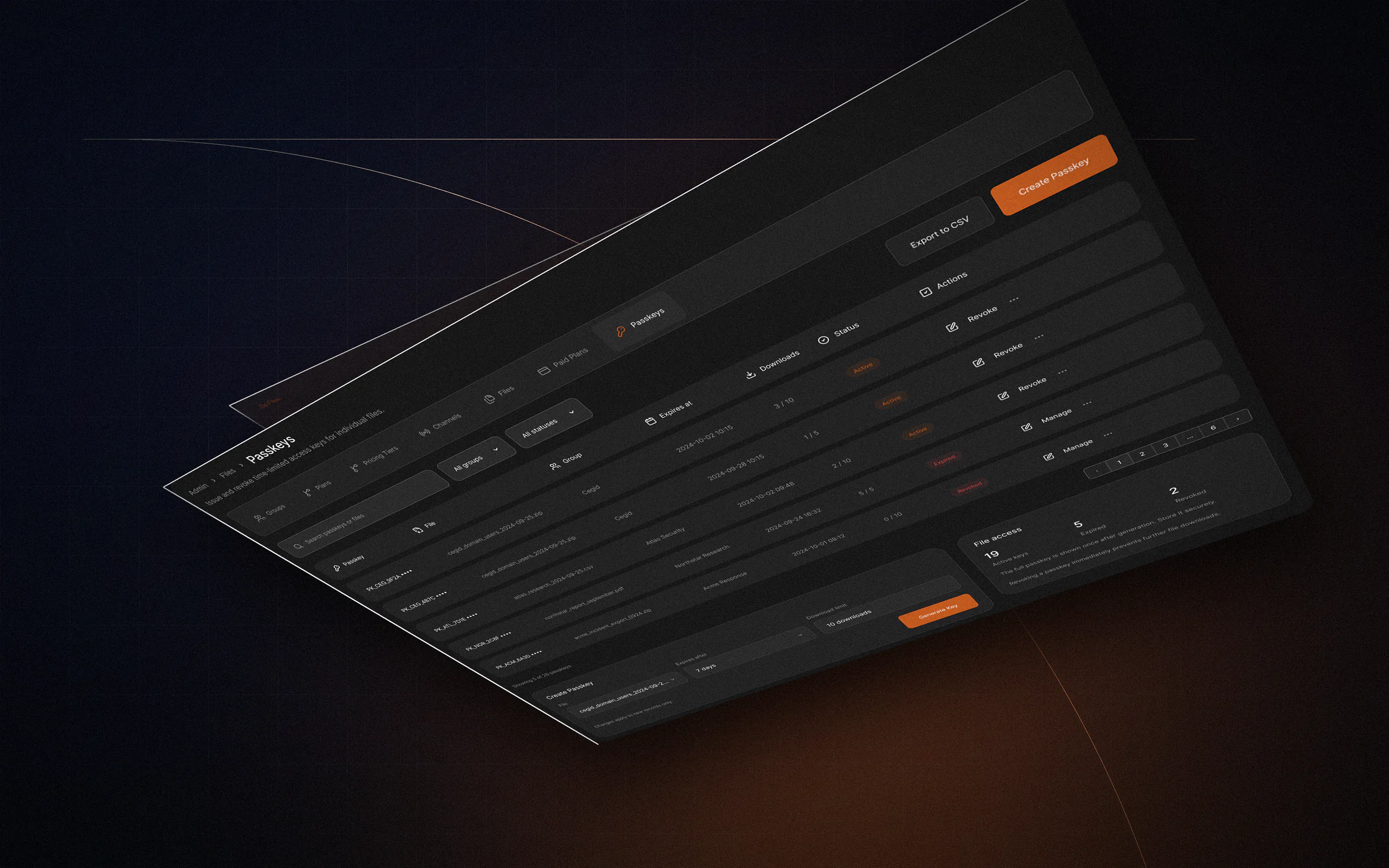
“Passkey” has a specific local meaning in these screens: a time-limited, download-limited key for a file. It is not the passwordless sign-in standard. The full key is shown once after generation, then represented by a masked identifier in the table . Expiry and a download allowance constrain its use, while Revoke is intended to stop further downloads immediately. The demo exposes those transitions with fictional keys. It models the workflow in the browser; a real service must enforce every limit on the server.
This live demo needs JavaScript.
The intelligence layer
Operating the intelligence layer
The group and channel model also supplies a boundary for AI retrieval. In the proposed architecture, every indexed record carries its group, source channel and access metadata. Retrieval filters by the requesting user’s permissions before selecting evidence; a model is never asked to decide whether a user is allowed to see a record. Derived features, cached summaries and exported assessments need the same scope. If access changes or a source expires under retention rules, the derived index and cached material need corresponding invalidation. The interface’s permission-denied state is therefore part of the intelligence workflow, not merely an administrative error page.
Each assessment should be reproducible from a versioned evidence snapshot, parser and feature definitions, ranking model or rule version, and the generative model and prompt configuration. The audit trail records what was supplied, which sources were cited and which human decision followed, while avoiding unnecessary retention of secret values. Drift monitoring can identify changing field distributions, source coverage or analyst-confirmation rates. A model release should be compared against the previous version on a fixed evaluation set and reviewed before wider rollout. Search ranking, explanatory drafting and response execution remain distinct permissions; the proposed AI does not autonomously revoke sessions or declare a case resolved.
What comes next
The strongest path is already visible: an organisation leads to a population, a device, an evidence category and an individual cookie. The administration model gives that path a commercial and access-control context. The next design work is to complete the states around it: loading, failure, confirmation and permission denied; alerts that are still noted as work in progress; the Documents page already named in navigation; and the result behind Analyze with AI. The APK tab variations also need one consistent treatment. These are concrete boundaries of the current design, and the next opportunities to make the workspace dependable.